a less-pro pro
Per usual, the basic MacBook Pro lags behind the flagships where it counts.
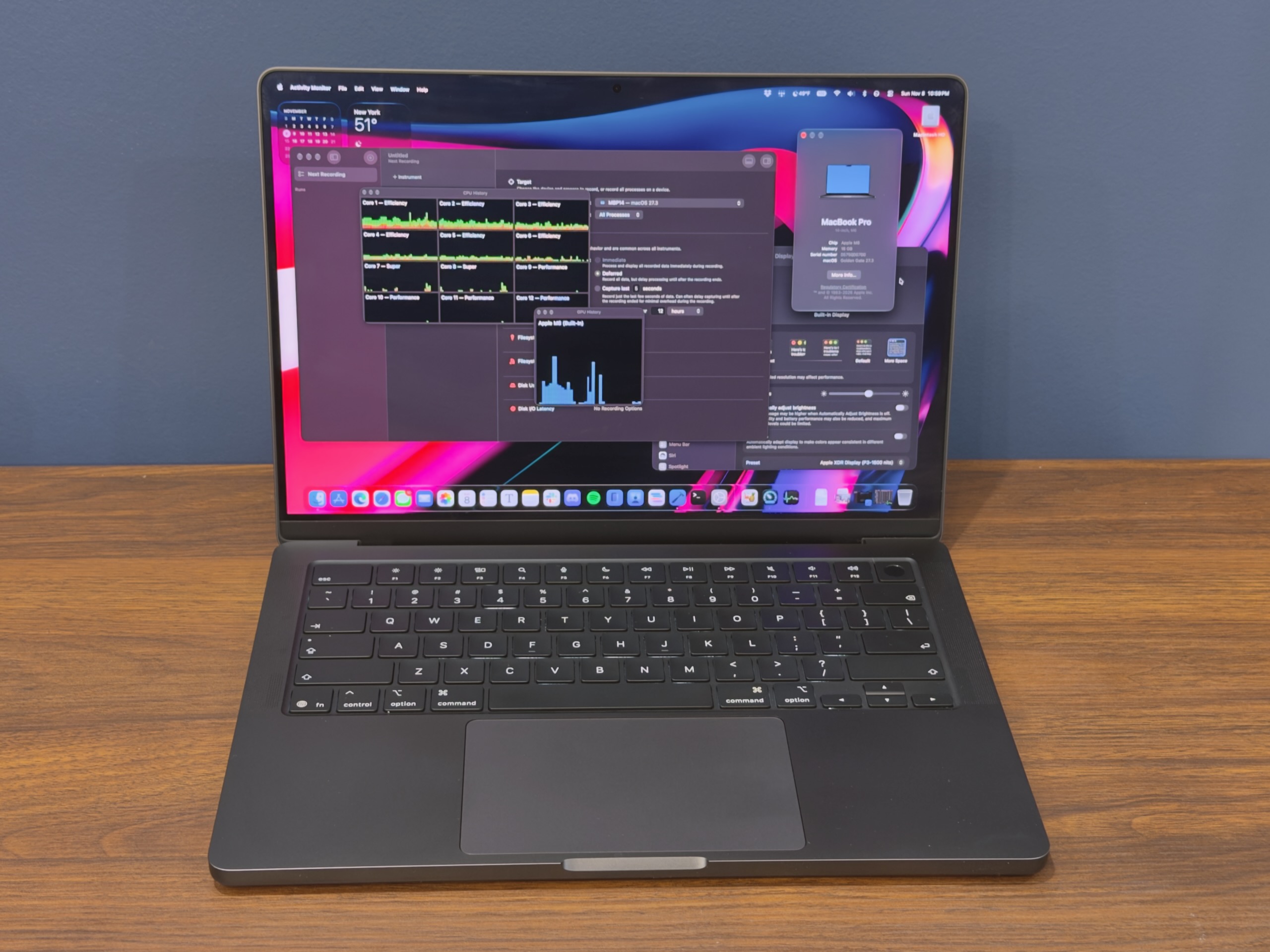
Apple's M6 MacBook Pro. Credit: Andrew Cunningham
Apple's M6 MacBook Pro. Credit: Andrew Cunningham
I’ve written more than once about the weird positioning of Apple’s entry-level 14-inch MacBook Pro, which has always occupied an uncomfortable perch between the MacBook Air and the higher-end MacBook Pros. The best versions of this laptop, like last year’s M5 refresh, come with the same basic design and external features of the higher-end MacBook Pros, just with a more modest processor and a lower ceiling for specs like RAM and storage.
The lesser versions stick with older designs or other compromises, reserving Apple’s most updated designs and screen technologies for the more expensive high-end models. Recall the 13-inch M1 and M2 MacBook Pros, which stuck with Apple’s 2016-era MacBook Pro designs for everything, up to and including the now-abandoned Touch Bar. (If you’re someone at Apple maintaining Touch Bar support into the 2030s for the sake of these two laptop models, I’d like to hear from you. Not for a story! I’d just like to know how you are.)
This year’s entry-level MacBook Pro mostly falls into that latter category. It does get an Apple M6 chip, and the M6 is great—rumors suggest the M6 won’t get Pro, Max, or Ultra configurations, so there are some fringe benefits here that you can’t get in the top-tier MacBook Pros. But it uses the same MacBook Pro design Apple has been using since 2021. There’s no touchscreen, no OLED panel, no Dynamic Island, no half-pound weight reduction, no glowing Apple logo on the lid.
In other words, it has very little of what makes the “PROLED XDR” MacBook Pros interesting, despite starting at an objectively very high starting price of $1,999. This is $700 more than the basic M1 MacBook Pro from 2020 and $400 more than the starting price of the M5 MacBook Pro from a year ago (though that model also got a mandatory 1TB storage upgrade and a $400 price hike when Apple raised most of its prices back in June).
That doesn’t mean there’s no constituency for the base-model MacBook Pro, which remains the cheapest way to get a 120 Hz ProMotion display or the anti-glare nano-texture display finish from one of Apple’s laptops. I just wish paying this kind of money was enough to get you Apple’s best technology.
Look and feel
There’s nothing new here compared to the M5 MacBook Pro, but just in case it’s been a few years, let’s run down the basics and go over what makes this laptop different from the MacBook Air.
Though it’s now a few years old, this iteration of the MacBook Pro design still looks and feels good, particularly with a nano-texture display installed. The laptop looks and feels (and is) thicker and heavier than either the 13- or 15-inch MacBook Air, but it also comes with more ports. In addition to the MagSafe port, a pair of Thunderbolt 4 ports, and a headphone jack on the laptop’s left side, you also get a dedicated HDMI port, another Thunderbolt 4 port, and an SD card reader on the right side.
For those who use USB-C chargers, it’s nice to be able to plug the laptop in to charge it from either side. For everyone else, it’s just nice to have more ports and need fewer dongles.
The MacBook Pro keyboard and trackpad are broadly pretty comparable to the Air’s, though if pressed, I’d say the Pro’s feels ever-so-slightly crisper and firmer to type on.
| 13-inch M5 MBA | 14-inch M6 MBP | 15-inch M5 MBA | 14-inch OLED MBP | |
|---|---|---|---|---|
| Display size/tech | 13.6-inch LED | 14.2-inch mini-LED | 15.3-inch LED | 14.2-inch OLED touchscreen |
| Display brightness | 500 nits | 1,000 nits (SDR), 1,600 nits (HDR) | 500 nits | 1,000 nits (SDR), 2,000 nits (HDR) |
| Resolution | 2560×1664, 60 Hz | 3024×1964, 120 Hz | 2880×1864, 60 Hz | 3024×1968, 120 Hz |
| Weight | 2.7 pounds | 3.4 pounds | 3.3 pounds | 3.0 pounds |
| Starting price | $1,299 | $1,999 | $1,499 | $2,899 |
At 14.2 inches, the MacBook Pro’s screen sits between the 13.6- and 15.3-inch MacBook Air, though in practice it feels closer to the 13. And while it’s not OLED, it still comes with some notable upgrades to the Air’s regular old 60 Hz IPS laptop screens. These include a mini LED display panel with local dimming support that helps to improve contrast and lower black levels, a higher resolution than either MacBook Air display, a maximum SDR brightness of 1,000 nits and HDR brightness of up to 1,600 nits, the $150 nano-texture matte display upgrade, and, of course, the 120 Hz ProMotion refresh rate.
This is no longer a cutting-edge screen within Apple’s lineup, but it’s still very nice. It’s the biggest selling point for the basic MacBook Pro—aside from the M6, though the Air will presumably get that chip eventually, as it usually does. More on that in a bit.
But now that Apple is using OLED touchscreens in its flagship laptops, we’ll hopefully see all these models benefit from the gradual technology trickle-down that we generally see in Apple products. Just as the older iPhone eventually inherited OLED panels and ProMotion support from the iPhone Pro, I hope that in the next generation or two, we see OLED/touch come to this baseline MacBook Pro and ProMotion and/or nano-texture displays come to the MacBook Air. At least, I’d like to see those things if Apple can add them without a big price hike.
Performance and power: M6 redux
Apple’s M6 debuted in the new Mac mini a couple of months back, and it performs about the same in the M6 MacBook Pro (and in the M6 iMac) as it did there.
As a recap, the M6 is a fairly major refresh for Apple’s lowest-end chip. Both the M4 and the M5 used a mix of four high-performance CPU cores and six high-efficiency CPU cores (up from four of each in the M1/M2/M3 generations), and a maximum of 10 GPU cores (M2 and M3 also had 10, M1 maxed out at 8). And all Apple Silicon chips up until the M6 shipped with a 16-core Neural Engine NPU.
| CPU S/P/E-cores | GPU cores | RAM options | Display support (including internal) | Memory bandwidth | |
|---|---|---|---|---|---|
| Apple M6 | 2S/4P/6E | 12 | 16/24/32GB | Up to three | 153GB/s (16GB), 170GB/s (24GB/32GB) |
| Apple M5 | 4S/6E | 10 | 16/24/32GB | Up to three | 153GB/s |
| Apple M4 | 4P/6E | 10 | 16/24/32GB | Up to three | 120GB/s |
| Apple M3 | 4P/4E | 10 | 8/16/24GB | Up to two | 102.4GB/s |
| Apple M2 | 4P/4E | 10 | 8/16/24GB | Up to two (one external) | 102.4GB/s |
| Apple M1 | 4P/4E | 8 | 8/16GB | Up to two (one external) | 68.25GB/s (est.) |
The M6 gets more CPU cores: two top-performance super cores, four performance cores, and six high-efficiency cores, for a total of 12. The GPU core count also increases to 12. And the Neural Engine is doubled, for a total of 32 NPU cores. RAM will still be the biggest limitation for the kinds of models that run well on an M6, but tasks that do engage the NPU should feel faster.
The RAM configurations on offer haven’t changed: 16GB is still the base, with 24GB and 32GB upgrade options. For the 16GB config, memory bandwidth is locked at 153 GB/s, the same as in the M5, but the 24GB and 32GB versions get a bump to 170 GB/s.
That brings us to our benchmark charts. The MacBook Pro review unit Apple sent ships with 16GB of RAM, down from the 24GB of RAM in the M6 Mac mini. That means the system is working with 90 percent of the memory bandwidth the Mac mini has; in practice, you mostly see this manifest as slightly lower graphics/gaming benchmarks, but they’re usually not enough to move the topline more than a couple of percentage points.
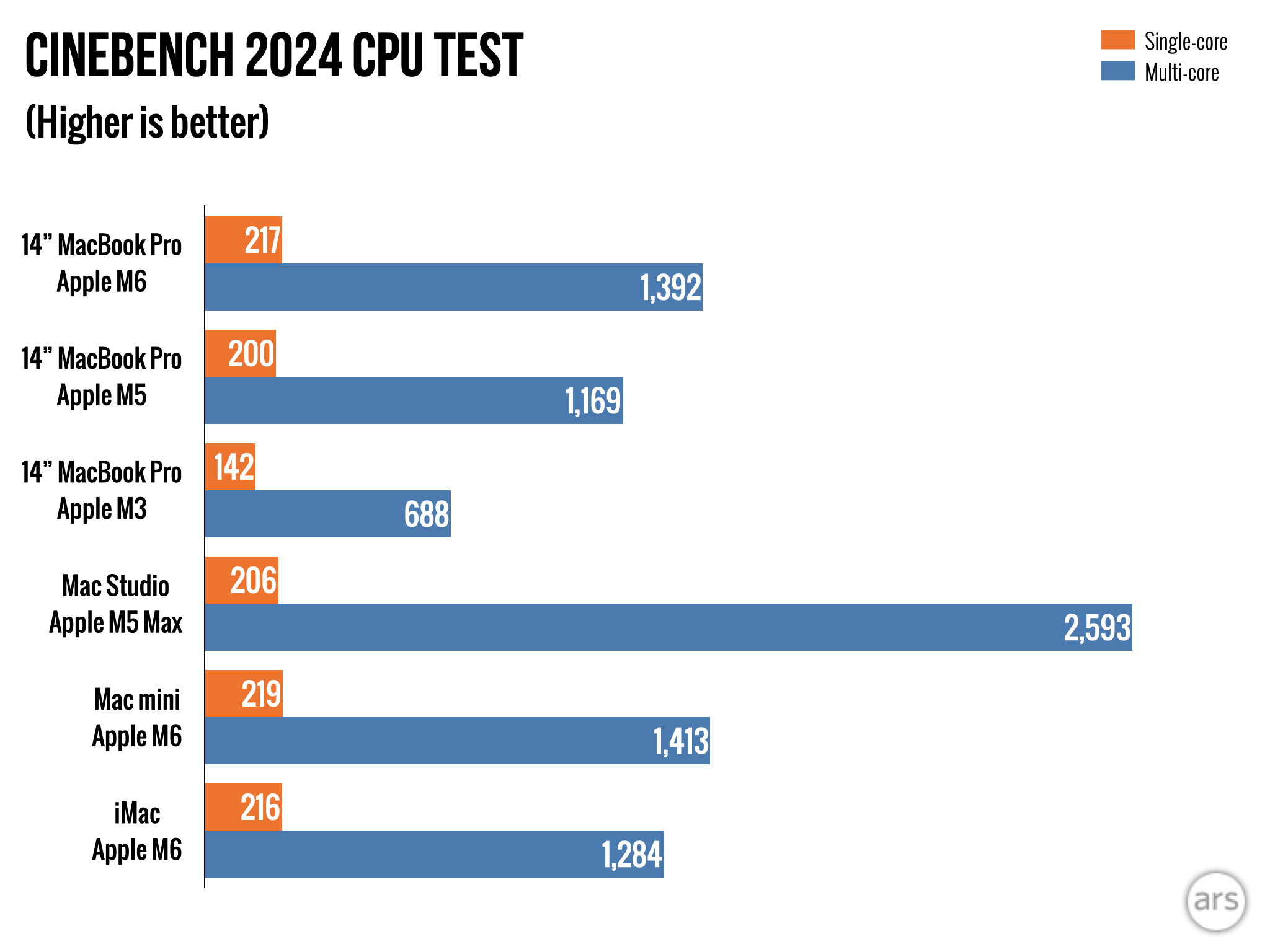
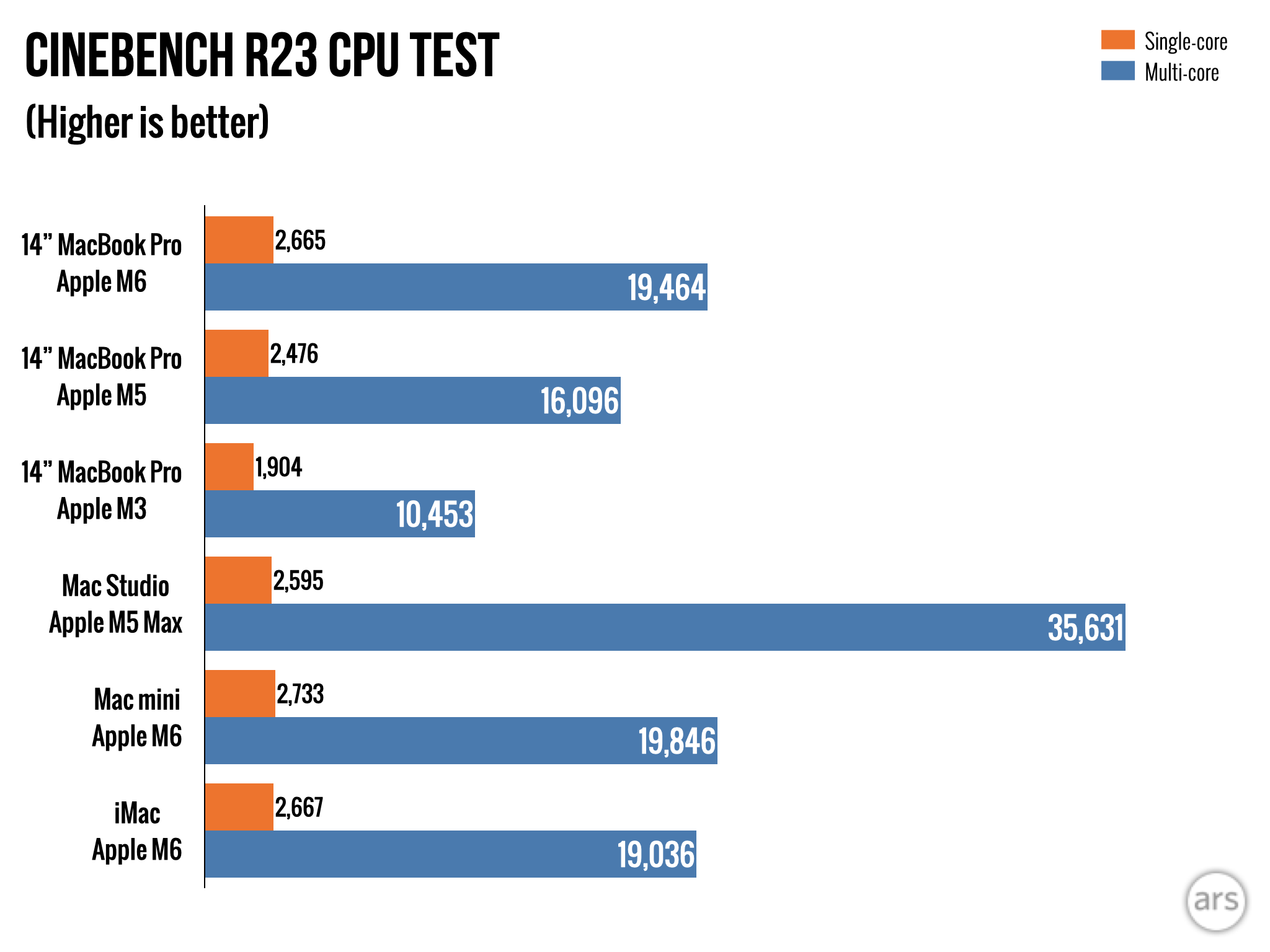
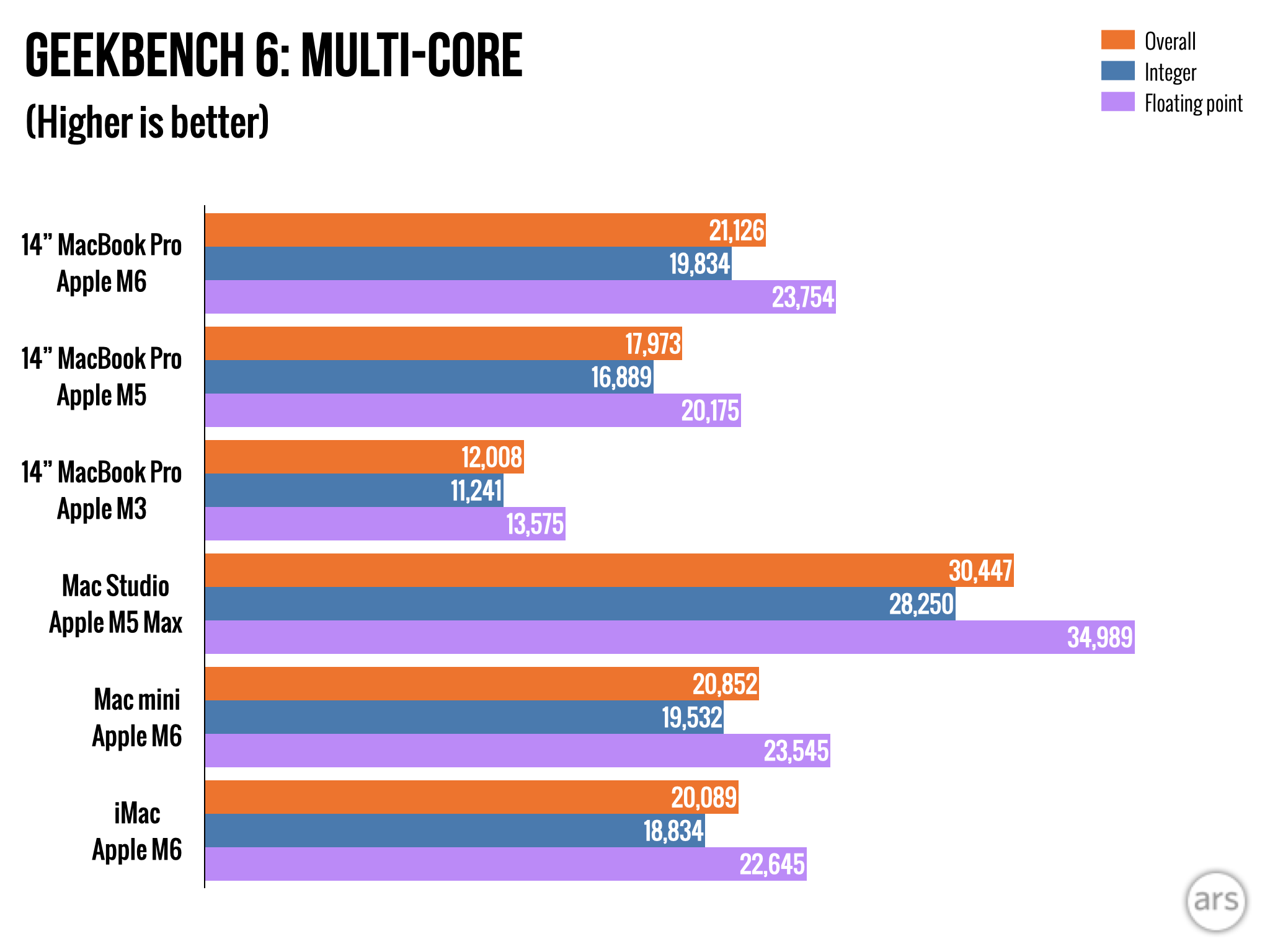
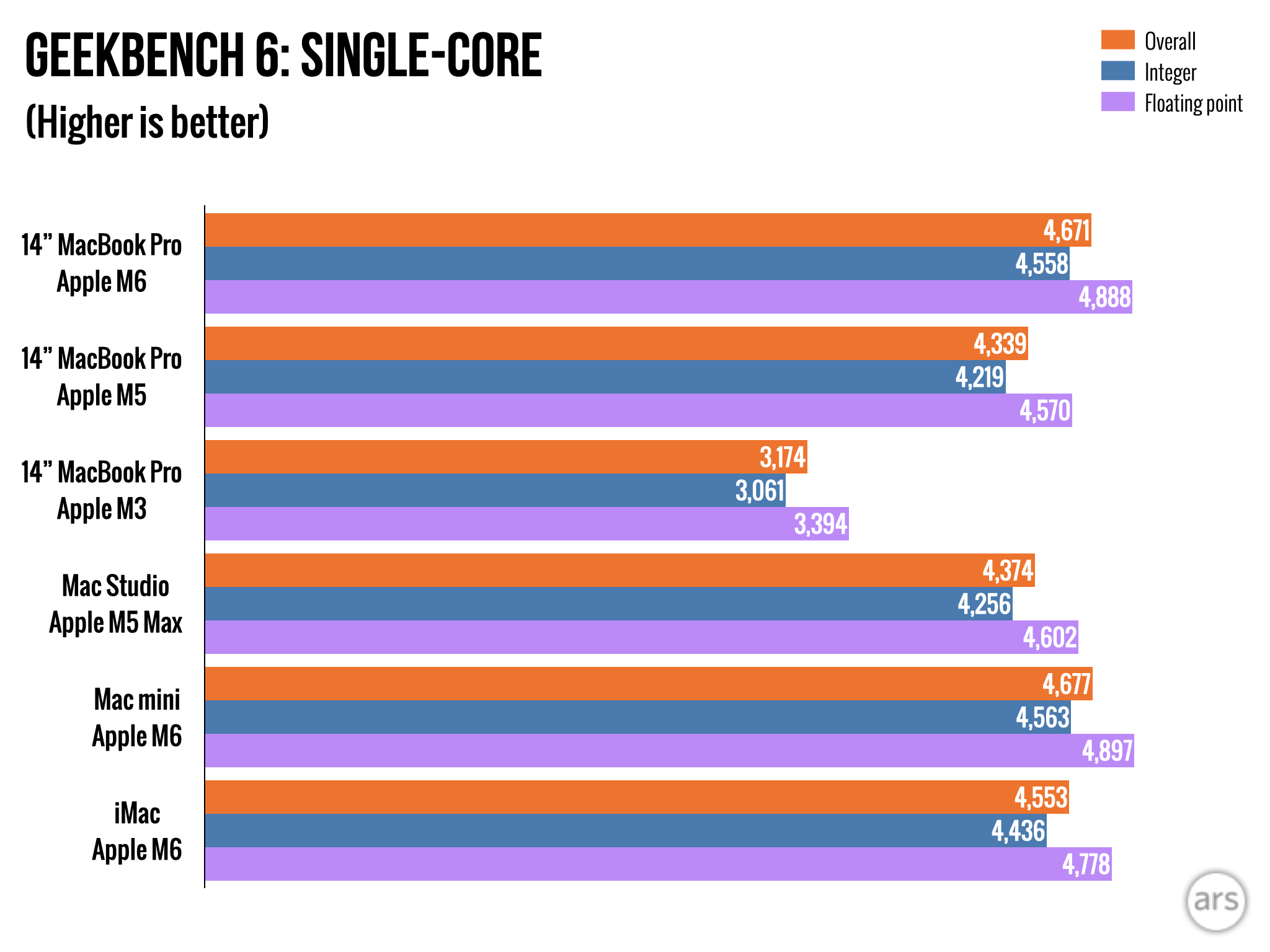
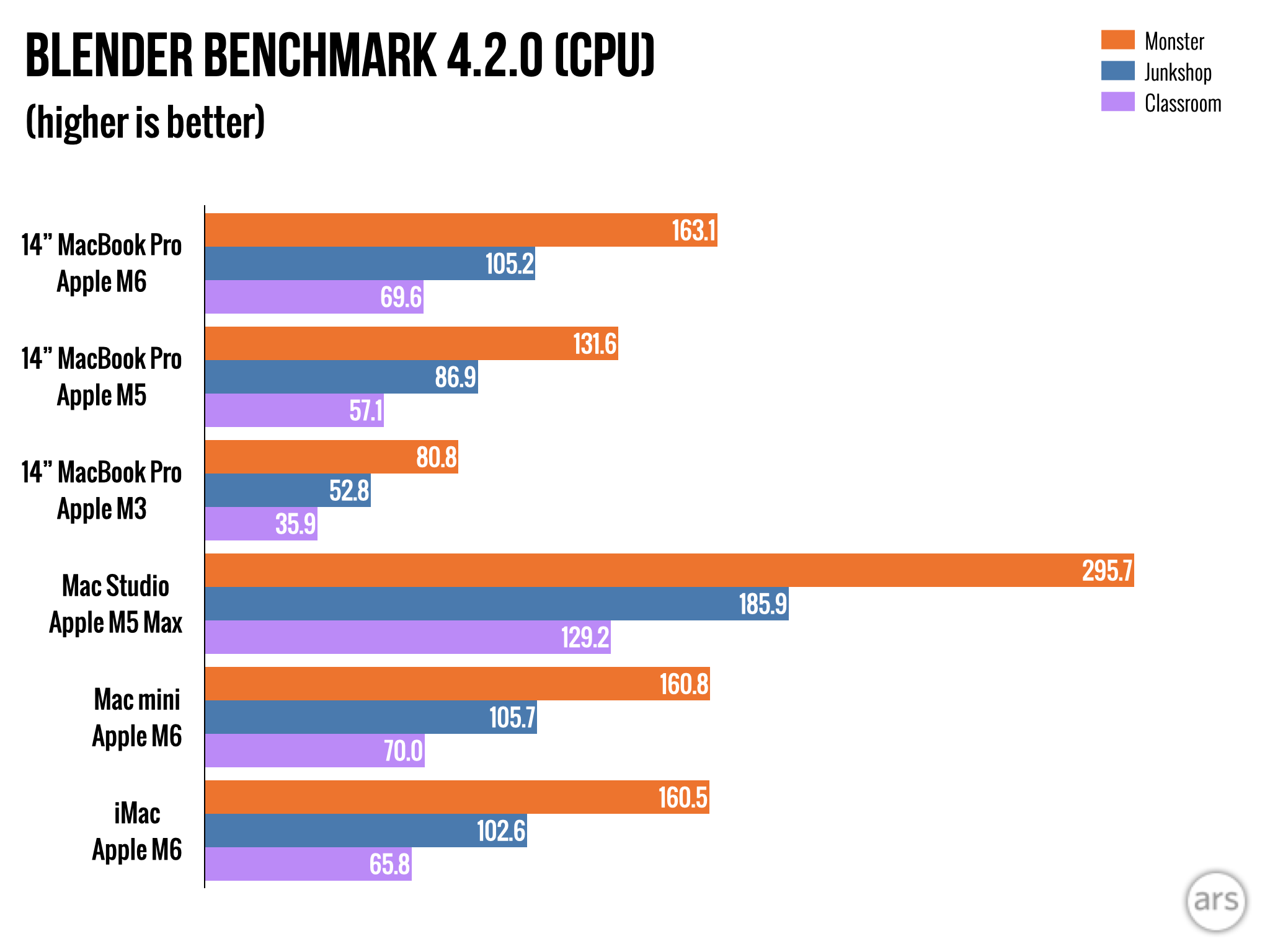
The chip is still a solid upgrade from the M5. Compared to last year’s M5 MacBook Pro, this year’s 16GB version offers around 7 percent and 15 percent better single- and multi-core CPU performance and between 20 and 30 percent better GPU performance, depending on the test.
As usual, Apple’s year-over-year performance upgrades add up when you’re jumping multiple generations at once. Compared to the M3 MacBook Pro, the M6 version offers around 30 percent better single-core CPU performance and between 40 and 60 percent faster multi-core CPU and graphics performance. So if you’re still using an M1 or M2 MacBook Air or Pro, you’re in for a sizable upgrade you should notice in day-to-day use. Compared to an M4 or M5, it will feel faster, but likely not staggeringly so.
As with the Mac mini, the basic MacBook Pro getting an M6-generation chip while the rest of the lineup sticks with the M5 means there are some specific ways in which this cheaper Mac is faster than the more expensive versions. While the M5 Pro’s higher core count definitely swamps the M6 for multi-threaded CPU work, the M6 still delivers Apple’s best single-core CPU performance, as well as the larger Neural Engine.
If and when the MacBook Air gets an M6, the MacBook Pro should still be the faster system, especially for sustained workloads. The MacBook Pro and Mac mini include active cooling fans, while the MacBook Air is fanless—the Airs have historically performed a little worse because they throttle their performance more quickly to keep temperatures in check.
Finally, a word on power usage. When I reviewed the M6 Mac mini, Apple’s built-in powermetrics tool wasn’t working with the M6 yet—it would run, but wouldn’t give any actual numbers. That’s been fixed since then, and the good news is that the power usage numbers are very boring. Under load, the M6 is faster than the M5 while consuming the same amount of power, which means it’s more power-efficient.
Pro-ish
Apple’s M6 MacBook Pro.
Credit: Andrew Cunningham
Apple’s M6 MacBook Pro. Credit: Andrew Cunningham
It’s an exciting year for the MacBook Pro! Just not for this MacBook Pro.
That’s to be expected, I suppose, since this MacBook Pro tier didn’t get the 2021-era design updates until the M3 version was released in 2023. I would not be surprised if we were left waiting at least two years for an OLED touchscreen to trickle down to this laptop.
After all, the OLED MacBook Pros haven’t even fully replaced the non-OLED versions of the M5 Pro and M5 Max laptops. I’d expect the next-gen versions of those laptops to bring the OLED touchscreens down to those price points and eliminate the non-OLED versions, and then for the basic MacBook Pro to get the new screens sometime after that. But that’s assuming some kind of normal-ish technology progression, and the times are still anything but normal, mostly thanks to the ongoing RAM and storage shortages.
The long and short of it is that this isn’t a bad laptop, but it is an awkwardly positioned one. This is always true, but this year more than usual. This laptop’s target buyer is “someone who is OK with MacBook Air-ish performance, but with more ports and the best-possible screen,” and the M6 version no longer gets Apple’s best-possible screen. Especially if you don’t need the now-mandatory 1TB storage allotment, it’s hard to look at the 13- or 15-inch MacBook Air, then look at this, and determine that you’re getting $500 to $700 worth of upgrades.
The good
- Excellent screen, keyboard, and trackpad
- M6 is more than fast enough for most consumer and many professional workloads, memory-hungry local AI models notwithstanding
- Having more ports than the MacBook Air is genuinely handy, especially if you plan to use this docked at a desk
The bad
- Comes with 1TB of base storage whether you need it or not, which helps boost the starting price to $1,999, $400 more than last year’s M5 model launch price
- Thicker and heavier than the redesigned OLED model
- No longer Apple’s best laptop screen
Andrew is a Senior Technology Reporter at Ars Technica, with a focus on consumer tech including computer hardware and in-depth reviews of operating systems like Windows and macOS. Andrew lives in Philadelphia and co-hosts a weekly book podcast called Overdue.
Source: Ars Technica · Andrew Cunningham
At a glance
- Topic
- Technology
- Country
- 🇺🇸 US
- Publisher language
- EN
- Added to Allnira